


Edits: Video Editor
4.75.28K Reviews
App Specs
- Version
- 452.0.0.50.64
- Updated On
- License
- Free
- Downloads
- 100,000,000+
- Developer
- Categories
- Video Players & Editors
- Platform
- Android, iOS
Screenshots
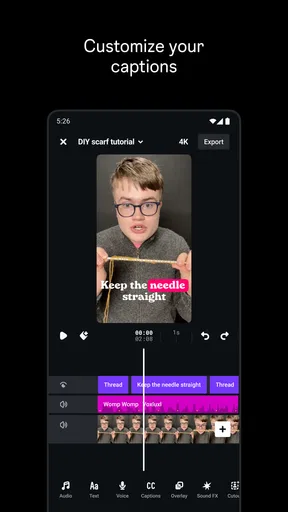
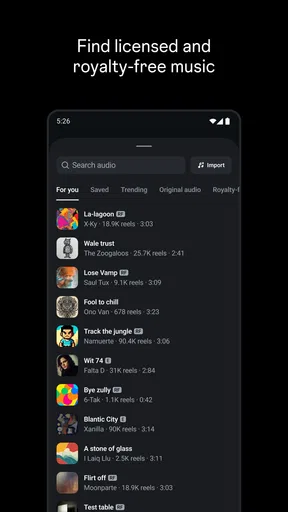
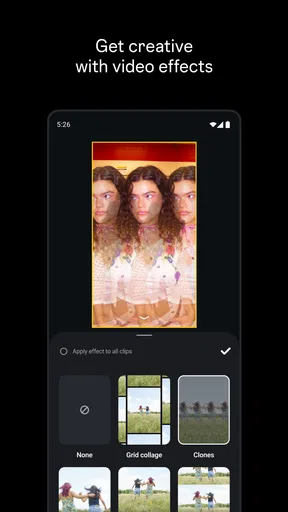
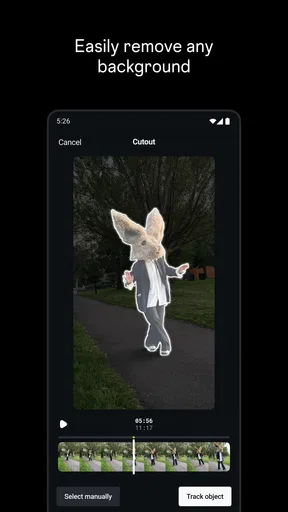
 Analysis by AppCompare
When I want to make a short video for Instagram without turning a quick idea into a long editing session, I look for an editor that keeps the process approachable. Edits is Instagram’s video-making app, and that focus is both its clearest appeal and the main thing to keep in mind: it is aimed at people creating social video, not at replacing a full desktop editing suite. I find it most useful when I want to shape a clip for a post or reel and keep the work moving on my phone.
Where Edits fits right now
Edits sits in the video players and editors category, but its connection to Instagram gives it a more specific role than a general-purpose media player. It is free, has an Everyone age rating, and is developed by Instagram. The app arrived on April 21, 2025, and its current version is 410.0.0.62.71. That makes it a relatively recent option for people who already create or share video through Instagram.
Its reception suggests that plenty of people are willing to try it: it has a 4.7 average from around 573,000 ratings and more than 50 million installs. Those figures can help establish that it has broad reach, but they do not tell me whether it suits every editing style. I would judge it by the job I need done: quick social video work is a more natural fit than intricate, long-form projects with demanding audio or color requirements.
A useful workflow for everyday clips
For a small creator, the value of a mobile editor is often less about having every imaginable tool and more about reducing the distance between an idea and a finished post. I might film a quick café visit, trim away the wait at the counter, choose the clearest moment, and prepare a short clip while the details are still fresh. A focused workflow can make that kind of casual content easier to finish instead of leaving it buried in the camera roll.
I also like to think about editing in passes rather than trying to polish everything at once. First I would decide what the clip is actually about, then remove pauses, check whether the opening makes sense without context, and only afterward consider visual styling. That order is practical in any short-form editor, and it helps keep decoration from distracting from the moment itself. With Edits, I would treat the Instagram destination as a reason to prepare a concise, platform-minded video, not as a reason to add effects just because they are available.
How it compares with other editing choices
Compared with a broad mobile video editor, an Instagram-focused tool is most appealing when the finished clip is meant to live in Instagram’s social environment. That can make the overall task feel more direct for someone who already posts there. A standalone editor may be a better choice if I want a highly customized timeline, a larger set of specialist controls, or a workflow that needs to move between several platforms and projects.
The right comparison is not simply which app has the longest feature list. It is whether the app supports the way I work. If I routinely make short clips for one social destination, a dedicated companion can be convenient. If I edit interviews, tutorials, or multi-scene videos where careful sound balancing and detailed revisions matter, I would favor an editor designed around that depth. I would also keep an original copy of important footage before editing, so a social-first workflow does not become the only place I can retrieve the material.
Worth Reading Before You Choose

Flipboard Shows What News Apps Must Do Beyond the Feed

Switching to Android Auto Means Rethinking Your Driving Routine

Google Calendar Makes a Crowded Week Easier to Manage

Ludo King Makes the Most of the Minutes Between Plans

Baby Panda World Brings Quick Play to Modern Phones, but Its Game Library Feels Busy

ESPN’s Live Game View Makes Following Close Games Easier
Who is likely to enjoy it
I would point a casual Instagram creator toward Edits if they want a phone-based starting point for making video and prefer not to begin with a complex production setup. It may also suit someone who posts irregularly and wants the editing step to feel manageable rather than like a separate hobby. The low barrier to trying a free app makes it easier to test whether that style of workflow fits before committing to a more involved tool.
On the other hand, I would not recommend choosing it solely because it is connected to Instagram. A person who mainly edits for other platforms, needs precise control over a long timeline, or expects a desktop-style post-production process should compare alternatives first. The same goes for someone who wants to build a repeatable, technically exact workflow: they should check whether the controls and export choices available in the app meet their requirements before making it their main editor.
Small habits that make editing easier
One useful habit is to decide on the clip’s purpose before opening the editor. A video meant to show a place, explain a quick tip, or capture a funny moment needs a different selection of shots, even if each one is short. I would keep only the footage that supports that purpose, because trimming with a clear story in mind is usually faster than trying to rescue every recording.
Another practical check is to watch the finished video once with the sound on and once without relying on it. That helps me notice whether the visuals make sense on their own and whether speech or background audio is distracting. I would also review the first few seconds especially carefully: a clip can look polished but still feel confusing if it takes too long to reveal what it is about. These are simple editorial checks rather than hidden app tricks, but they can improve a social video regardless of which editor I use.
What I would check before relying on it
Before making Edits part of a regular routine, I would try a low-stakes clip and confirm that the result suits the way I want to post. I would check the saved video on my own device, make sure the framing looks right, and confirm that any text or key visual detail remains readable on a small screen. If I plan to reuse a clip elsewhere, I would also consider whether the export and workflow fit that destination rather than assuming a social-first edit will transfer perfectly.
It is also sensible to think about account and device habits before starting a project. Keep the source footage until the final version is safely saved, and avoid deleting the only copy just because an edit appears complete. If an app update changes how a familiar workflow behaves, trying the same simple test clip again is a low-effort way to catch a change before it affects something important. The current version gives users a clear point of reference, while future changes are something to assess when they actually arrive rather than assume in advance.
What the early product stage means
Because Edits was released in 2025, I see it as a newer entry in a crowded mobile editing space, not as a tool whose long-term direction can be taken for granted. Its current version, 410.0.0.62.71, is a concrete snapshot of the app today; it does not by itself tell me which features will come next. For existing users, that is a reason to keep project habits flexible: save finished work, retain useful originals, and avoid building an essential production process around a feature until it has proved dependable for their needs.
What I would watch is whether the app continues to make the path from filming to sharing smoother without making editing feel locked to one destination. That matters most to people who create frequently and need predictable results. Occasional creators may care more about whether the basics remain approachable and whether a short clip is easy to prepare. In either case, future improvements should be judged by the actual work they make easier, not by assumptions based on a version number or a promising launch.
My take on the trade-offs
My main reservation is about fit, rather than a claim that the app is difficult or unreliable. A focused social editor can be convenient, but the convenience may come with less room for people who want an elaborate, highly controlled production workflow. I would test a representative project before moving all my editing into it, especially if the video includes several scenes, spoken explanation, or details that need careful review.
For a quick Instagram-bound clip, though, the idea behind Edits makes sense: keep the creation process close to the place where the video will be shared. I would choose it when speed and a social-first routine matter more than having every specialist control at hand. I would choose a broader editor when flexibility, detailed finishing, or cross-platform reuse is the priority. That distinction is more useful than calling one option universally better.
A practical recommendation
If you already make videos for Instagram, I think Edits is worth trying as a convenient place to prepare a simple post. Start with a short, unimportant clip, learn how the editing and saving steps fit your habits, and compare the result with what you would normally publish. If the process feels natural and the output meets your needs, it can earn a place in your toolkit without requiring you to abandon other editors.
If you need detailed production controls or regularly create for several destinations, keep your expectations measured and test the workflow before depending on it. I see Edits as a promisingly specific option for mobile social video, not a universal answer for every editing job. Its usefulness comes down to whether its Instagram-oriented approach matches what you make and how much control you need along the way.
Scrolling through the app store, I stumbled upon Edits, an Instagram App that promises to sprinkle a little magic on your photos. I decided to give it a whirl, and boy, was I in for a treat! Let me walk you through my experience with this app.
Getting Started with Edits
First things first, downloading Edits was a breeze. A quick install and I was ready to dive into the world of photo enhancement. The app's interface is sleek and user-friendly, making it super easy to navigate. Whether you're a newbie or a seasoned Instagrammer, you’ll feel right at home.
Features That Stand Out
The feature list is where Edits truly shines. From basic adjustments like brightness and contrast to more advanced tools like curves and selective color, this app has it all. I was impressed by the variety of filters available. Unlike many apps that offer generic options, Edits has unique filters that add a professional touch to your photos.
Another standout feature is the layer editing. This allows you to stack multiple effects and adjustments, giving you complete control over the final look of your image. It’s like having a mini Photoshop in your pocket!
User Experience
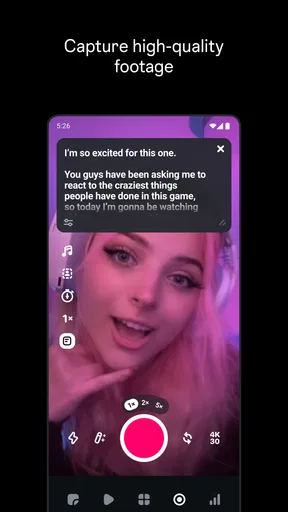
One thing I appreciated was the app’s smooth performance. No lag, no crashes, just seamless editing. The tools are intuitive, and I didn’t find myself scratching my head trying to figure out what to do next. The real-time preview is a lifesaver, letting you see changes instantly before committing to them.
Sharing and Connectivity
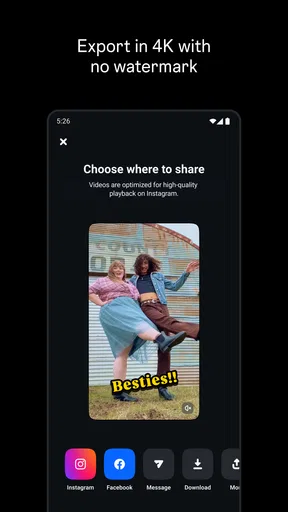
Once your masterpiece is ready, sharing it on Instagram is a piece of cake. The integration is flawless, and you can post directly from Edits without any hassle. It’s also great that you can save your photos in high resolution, ensuring they look crisp and clear on any device.
For those who love a little community interaction, the app also features a social hub where you can discover other users’ creations and get inspired. It’s a nice touch that adds a community feel to the app.
Final Thoughts
Overall, my time with Edits was nothing short of enjoyable. The app is packed with powerful features, yet remains accessible to everyone. Whether you're looking to enhance your daily photos or create stunning visuals for your Instagram feed, Edits has you covered.
So, if you're looking to up your Instagram game, give Edits a shot. It’s like having a personal photo editor right in your pocket, ready to transform your pictures into works of art.
Pros
- User-friendly interface for quick editing.
- Wide range of filters and effects.
- Seamless Instagram integration.
- Supports high-resolution exports.
- Regular updates with new features.
Cons
- Limited advanced editing tools.
- Some features require in-app purchases.
- Occasional ads can be disruptive.
- No batch editing option available.
- Requires an internet connection.
FAQs for Edits: Video Editor
What is Edits, and how does it enhance my Instagram experience?
Edits is a powerful app designed to elevate your Instagram content by offering a variety of editing tools and features. With its user-friendly interface, you can apply filters, adjust lighting, and add effects to make your photos and videos stand out. It seamlessly integrates with Instagram, allowing you to share your enhanced content directly on your feed or stories.
Is Edits available for both Android and iOS devices?
Yes, Edits is available for download on both Android and iOS platforms. You can find it on the Google Play Store for Android users and the App Store for iOS users. This cross-platform availability ensures that you can enjoy its features regardless of your device type, making it accessible to a wide range of users.
Are there any in-app purchases or subscription fees in Edits?
Edits offers a freemium model, meaning that while there are many free features available, some advanced tools and filters may require in-app purchases or a subscription. This allows users to access a basic set of editing tools for free, with the option to unlock additional features for a more comprehensive editing experience.
How does Edits ensure the privacy and security of my content?
Edits prioritizes user privacy and security by implementing strong data protection measures. The app does not store or share your photos and videos without your consent. Additionally, it complies with relevant data protection regulations, ensuring that your content and personal information remain safe while using the app.
Can I use Edits to edit videos as well as photos?
Absolutely! Edits is equipped to handle both photos and videos, offering a range of tools specifically designed for each format. Whether you want to trim, filter, or add effects to your videos, Edits provides the flexibility and functionality needed to enhance your multimedia content before sharing it on Instagram.


